

Price comparison · new on Netslim EdgeTM
See what other shops charge. Match them with one click.
Every day, the prices of the same product at other shops, next to yours. In your own WordPress, one button per product. Your price in your cash register and accounting stays the same.
- 100 products in the package
- 1 button per product
- 0 changes in your accounting
- Shop A€ 164.90
- Shop B€ 171.50
- Shop C€ 179.00
- Your shop€ 189.00€ 163.25
Why
Your customers are already comparing. Now you can too.
Whoever wants to buy opens a second tab and looks up the price. The Price Comparison does that for you every day, for the products that matter, and lets you choose per product what to do with it.
Your position per product
Cheapest, in between or most expensive: you see it in one list, with the lowest price elsewhere and which shop that is. The same product, compared by EAN.
One button: just below
Click "Set" and your product appears on your site just below the cheapest. For the whole list it can also be done at once, with a preview and a warning for prices that look too low.
Your administration stays
The campaign price applies only on your site. The price in WooCommerce and in your accounting or ERP is not overwritten. One click and your regular price is back.
This is what it looks like
Fair on your product page
If you want, the comparison also appears on your product page: calmly, with the time of the last check. Whoever sees that you are the cheapest does not need to look any further.
- Chosen wiselyThe plugin itself selects your most popular products: what you advertise, what is viewed often and well-known brands.
- Often viewed, not yet comparedIf visitors often look at a product that is not yet included, it suggests it. Adding it is one click.
- Trending in your industryWhere people have searched more over the last 90 days for your brands, whether you sell it, and whether you are the cheapest there. Updated every week.
- Purchase price and marginEnter your purchase price and see your margin per product, and what you keep if you follow the lowest price. Never below your purchase price.
- Your ads includedFor each product you can see whether you advertise for it, and for how many of those products your price is the lowest.
- Check yourselfFor each product a button to your own page and a button to Google, so you can check the prices live.
- Never below your floor priceSet a floor price per product. It will not go lower, not even with the button for all at once.
- Shop A€ 164.90
- Shop B€ 171.50
- Shop C€ 179.00
- Your shop€ 189.00€ 163.25
Live at a customer
How the Price Watch works in a real webshop
No demo. This is the Price Watch as it currently works at proffix.eu, a Belgian specialist tool retailer with over 5,000 products.
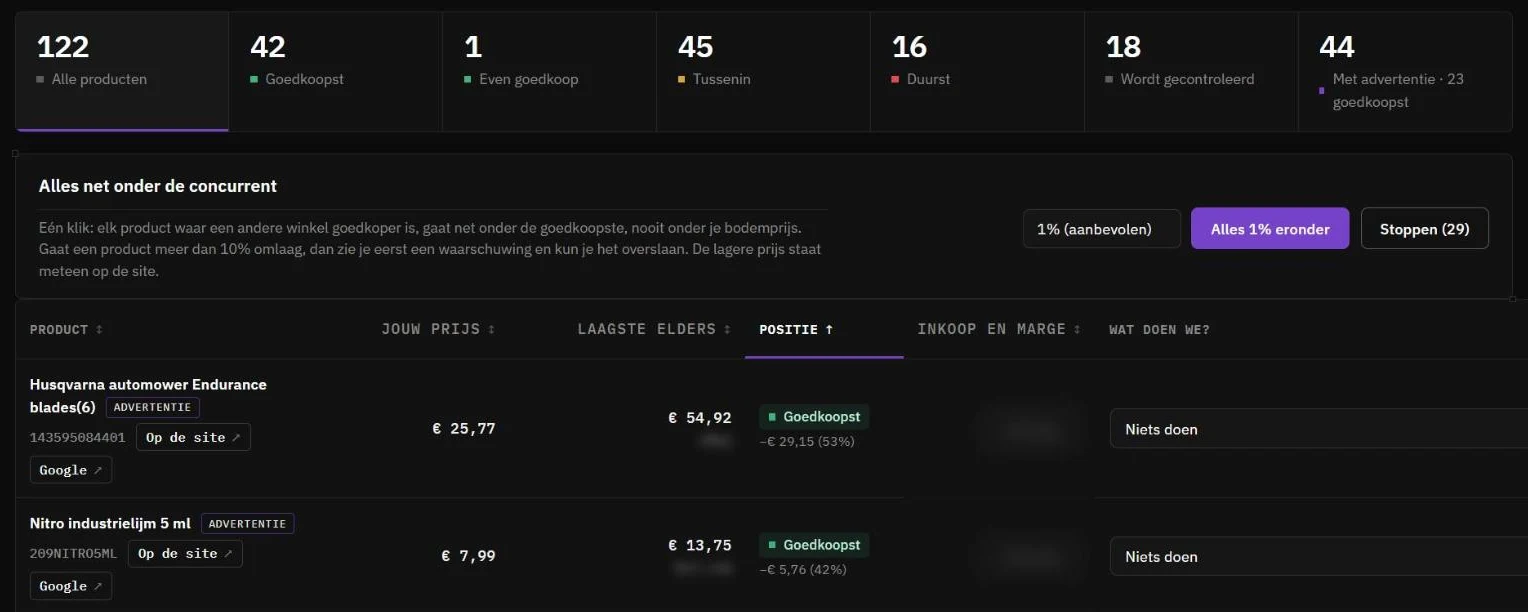
Swipe sideways to see the full screen, or tap to enlarge.
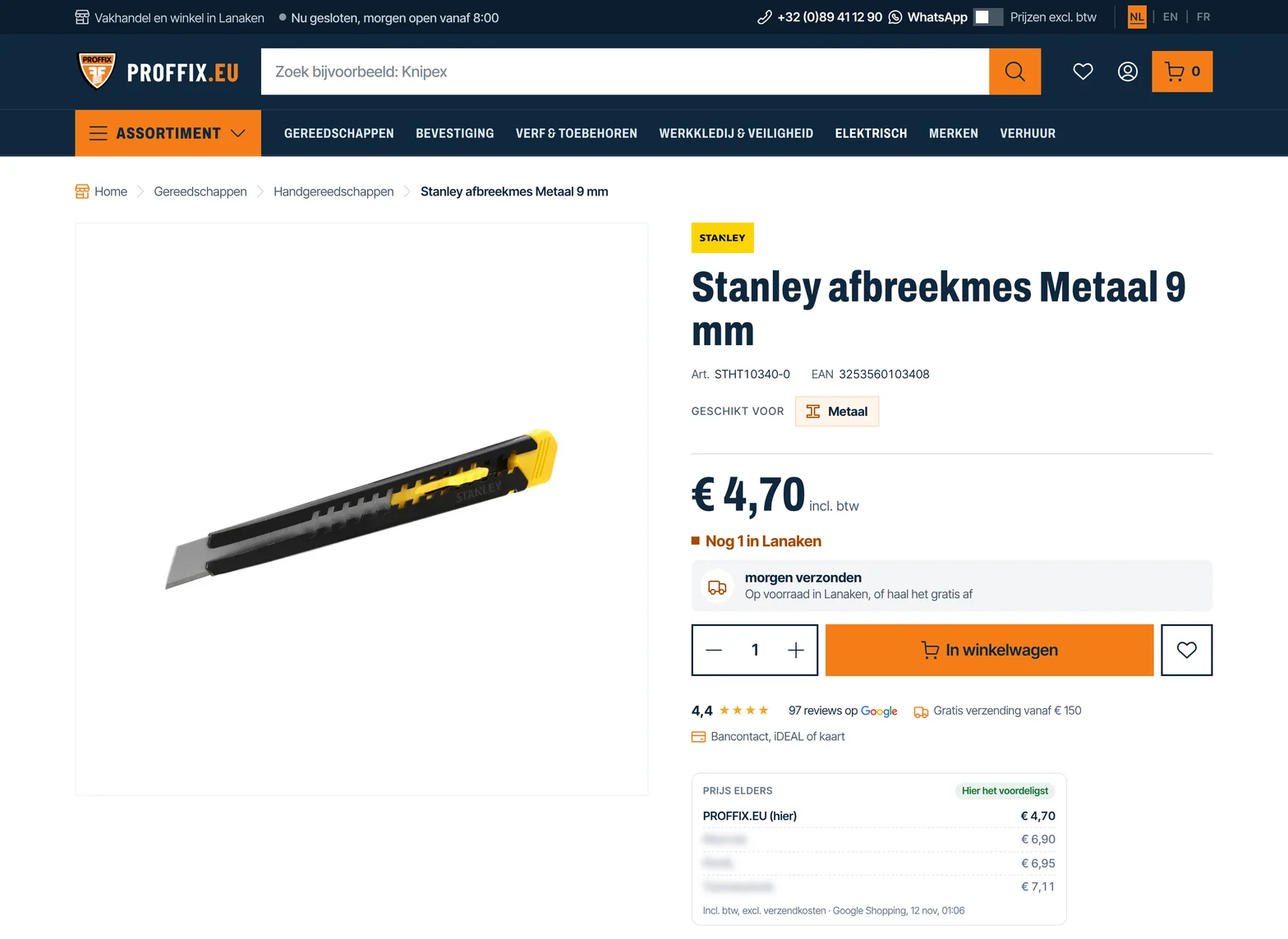
Swipe sideways to see the full screen, or tap to enlarge.
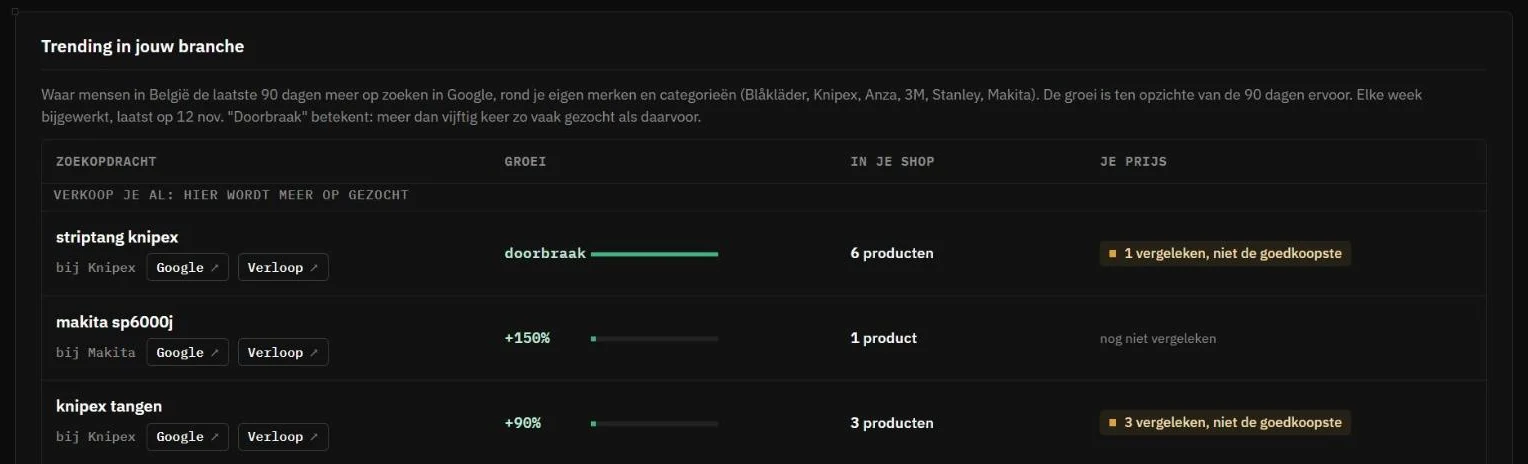
Swipe sideways to see the full screen, or tap to enlarge.
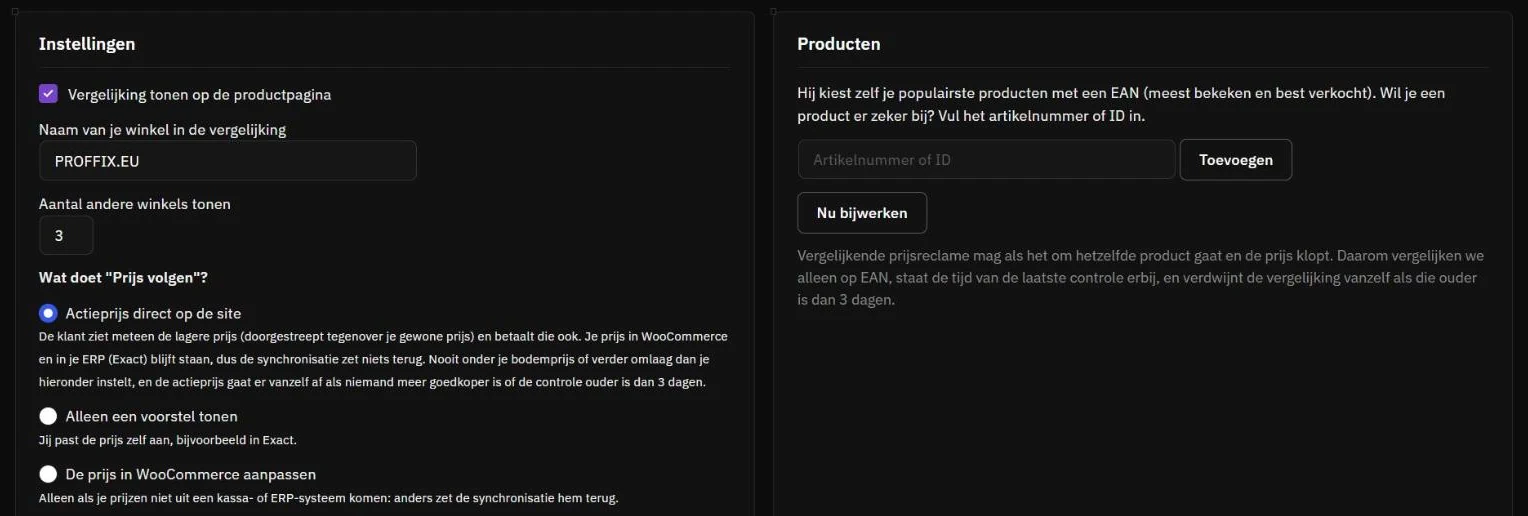
Swipe sideways to see the full screen, or tap to enlarge.


Real screenshots of proffix.eu and of the management of that webshop, taken on 12 November 2026. Names of other shops and purchasing details have been blurred.
How it works
Up and running in a quarter of an hour
- Turn on the Price ComparisonIn your Edge portal under Price Comparison. Your site runs via Netslim EdgeTM; if you do not have Edge yet, you start there.
- Install the pluginDownload it in your portal and upload it to WordPress. It connects itself via your domain, with no key to type in.
- The first prices come inThe plugin selects your 100 most popular products with an EAN. The first prices are usually there within a few hours, and then again every day.
- You choose per productDo nothing, get a notice when someone is cheaper, or follow the price. Everything in your own WordPress.
Price
Per site, cancel monthly
- 100 products, checked every day
- Extra products: € 1.00 per product per month, to order with one click in the plugin
- One country in the package (Belgium or the Netherlands). Extra country: € 0.30 per product per month
- One button per product, or everything at once with a preview
- Comparison on your product page, on or off per product
- Plugin for WordPress with WooCommerce
For webshops running via Netslim EdgeTM. Prices excl. VAT. The prices of other shops come from Google Shopping.
Questions
Good to know
Does this change my prices in WooCommerce or my accounting?
No. The campaign price applies only to your site, for as long as you want. Your price in WooCommerce and in your accounting or ERP stays in place, even if a connection manages that price.
How do I know it is the same product?
We compare on EAN and check the name, brand and model number. If a price seems too low, you get a warning and you can skip that product. With the Google button you can check it yourself.
Can I show prices from other shops?
Comparative price advertising is allowed, as long as it concerns the same product, the price is correct and it can be verified. That is why the time of the last check is shown, and the comparison disappears if it is older than three days.
What if I want to track more than 100 products?
Then you order for € 1.00 per month per product. You can do this in the plugin itself, with a short confirmation.
What is the difference with Price Watch?
Price Watch tracks the shops you point to. The Price Comparer finds out for itself which shops sell the same product and works from your own WordPress.
