Lightning fast
We remember customers and products for you. Copy an old invoice, change the amount and click send.
Free tool
For freelancers and small businesses. With 21% and 9% VAT, reverse-charge VAT, KOR and export, all with the correct notation. Your customer gets a clean PDF and an online link. One free invoice every month, unlimited with Pro for € 5.
We remember customers and products for you. Copy an old invoice, change the amount and click send.
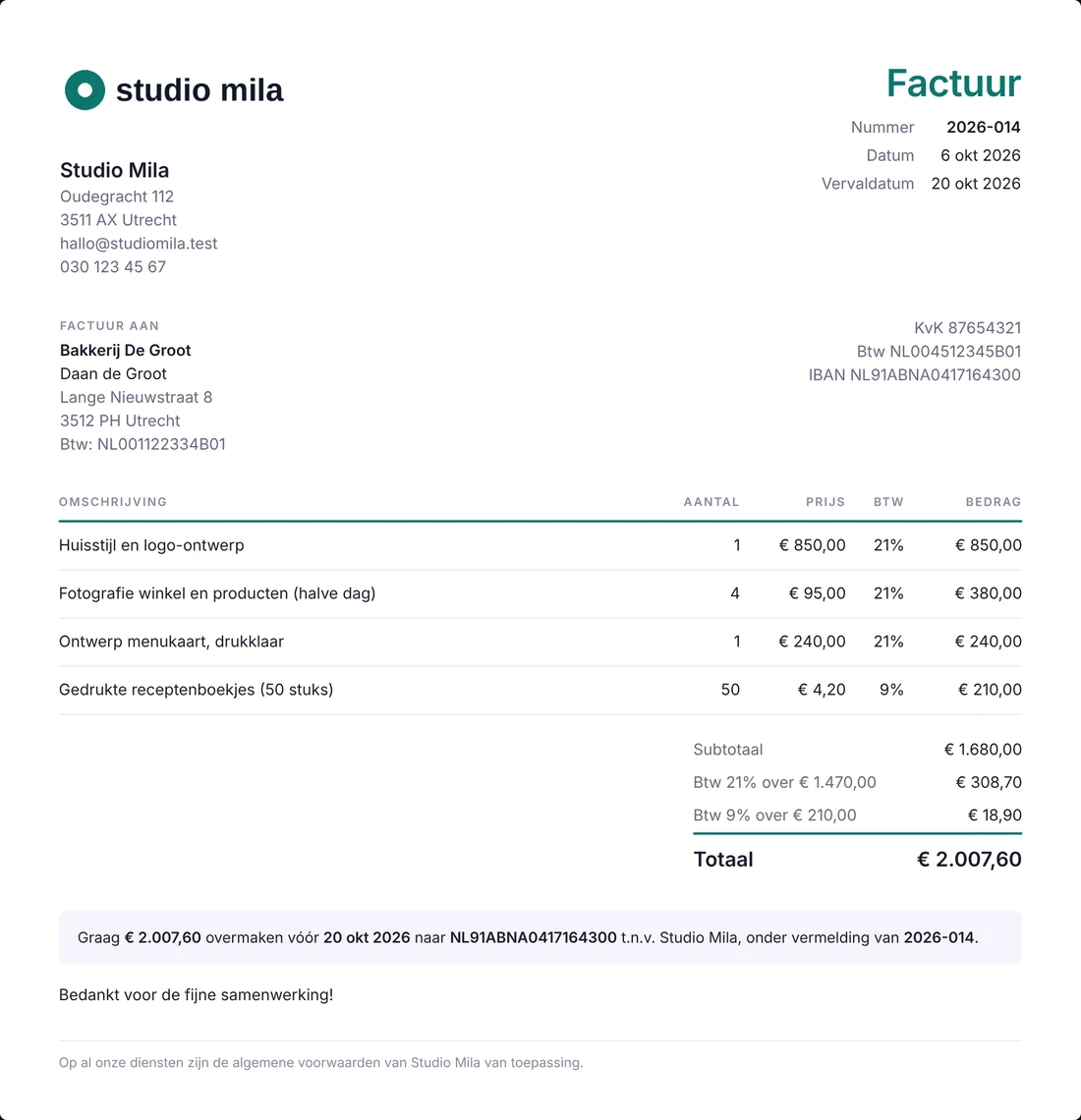
Sequential numbering, VAT per line (21, 9 or 0%), reverse-charge VAT, KOR and export. Chamber of Commerce number and IBAN are added automatically.
Your customer gets an email with the PDF and an online link. Replies come straight to you, not to us.
See what is outstanding, what has come in and who is late. One click on "paid" and your records are up to date.
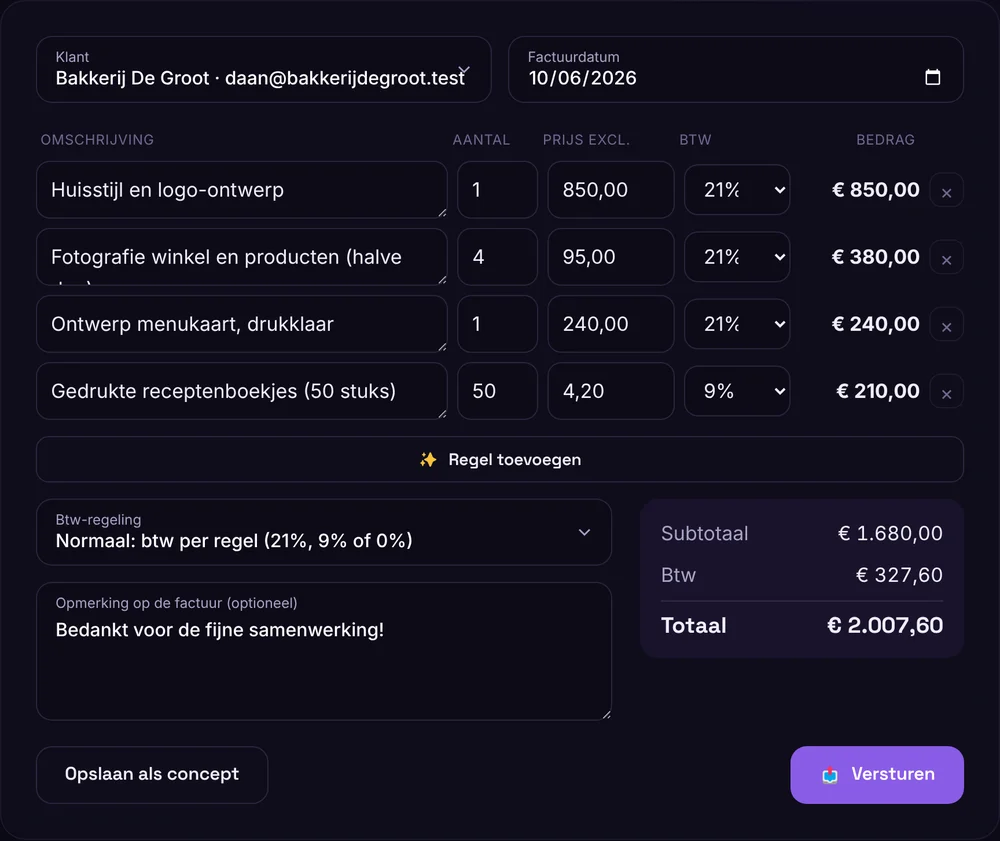
This is what it looks like
Amounts are calculated live, even with multiple VAT rates on one invoice. With Pro, your own logo and colour appear on it.
VAT without the hassle
Freelancer under the KOR? Customer in Germany? Subcontractor in construction? Choose the scheme and we add the required wording automatically.
The standard rate for most products and services: web design, advice, photography, business coaching.
For example food and a number of services, such as the hairdresser or bike repair shop. Mixing rates? Choose 21% or 9% per line.
Business customer in another EU country with a VAT number. You charge 0%, your customer accounts for the VAT in their own country.
On the invoice: "VAT reverse charged to the customer + customer VAT number"For example for subcontracting in construction. The main contractor accounts for the VAT.
On the invoice: "VAT reverse charged to the customer + customer VAT number"Turnover under € 20,000 per year and registered for the KOR? Then you don't charge VAT. Set it once and it appears correctly on every invoice.
On the invoice: "Exempt from VAT under the KOR"Some services are outside the scope of VAT, for example in healthcare or education (article 11 Wet OB).
On the invoice: "Exempt from VAT under article 11 Wet OB"Do you work for a customer in, for example, the US, the UK or Switzerland? Then your service is usually not taxed in the Netherlands.
On the invoice: "Service outside the EU: 0% VAT"Products at 9% and services at 21%? No problem: the VAT is added up separately per rate, just as it should be.
Not sure which scheme suits you? Check with your accountant or the Dutch Tax Administration. We make sure the invoice is correct for the choice you make.
Invoice requirements
If you forget something on an invoice, your customer cannot deduct the VAT and you get awkward questions later. That is why the tool simply adds it automatically.
Try it for freeSame work every month? Copy the previous invoice, change the date, done.
Your customer opens the invoice in the browser and downloads the PDF whenever they want.
Mark invoices as paid and see at once what is still open and who is late.
We remember customers with their address and VAT number, so you can pick them like that on the next invoice.
The email comes from us, but if your customer clicks reply, it reaches you.
On Dutch servers, with two-step verification on your account. Also download your PDFs for your own records.
No contract. Cancel monthly.
no credit card needed
excl. VAT · or € 50 per year
Yes. You send one invoice per month without paying. It carries a small "made with Netslim" watermark. Drafts and customers are unlimited.
By iDEAL or credit card the first time, then automatically per month or per year. You can cancel monthly at any time, right in your account.
No. In Belgium, VAT-registered companies have had to send invoices to other companies via Peppol since 1 January 2026, and a PDF by email is no longer enough. Use an accounting package with a Peppol connection instead. For companies in the Netherlands, everything works as usual.
They contain everything the Dutch Tax Authority requires: a sequential number, date, your KvK and VAT number, the VAT per rate and, for EU customers, the note "VAT reverse charged". Make sure you enter your details correctly under Settings.
A neat email with your name as sender, the PDF as an attachment and a link to view the invoice online. If your customer replies, it lands in your inbox.
Yes. Under Settings, choose "KOR" as the default VAT scheme. No VAT is then added to your invoices, and the note "Exempt from VAT under the small business scheme (KOR)" is added automatically.
Under the lines, choose "Reverse charge: customer in another EU country" (or "within the Netherlands" for construction, for example). VAT goes to 0%, the text "VAT reverse-charged to the customer" is added, along with your customer's VAT number. If you don't have your customer's VAT number, we won't let you send a reverse-charge invoice to an EU customer, because the invoice would be incorrect.
Yes. You choose the rate per line. At the bottom, the VAT is shown separately per rate, as the Dutch Tax Authority requires.
Choose "Export: customer outside the EU". You then charge 0% and the correct note is added to the invoice.
The Dutch Tax Authority asks you to keep your records for 7 years. Your invoices stay in your account, and you can download every PDF for your own records or your accountant.
Create a free account and try it. No credit card needed.

The conversation continues on WhatsApp, so you don't have to repeat anything.